

Theory
GitHub releases and versions: tags, SemVer, changelogs
What a git tag is, how to read a version number like v1.4.1 (SemVer in plain words), how GitHub releases and generated release notes work, how release notes differ from a changelog, how to check whether a fix is in a version, and why merged, released and live for every user can be three different moments.
~11 min read · 11 exercises · 250 points
Before you start
Which version is the fix in?
Back on CatChow's product team, support has a request about the checkout fix: they want to tell customers "fixed in version so-and-so", like app update notes. The honest answer for now is that #134 isn't in any version at all.
In this lesson you'll learn what tags and version numbers mean, how GitHub releases and release notes work, and why merged, released and live for every user can be three different moments.
A tag: a fixed name for one commit
A tag is a fixed name for one commit. A branch moves forward with every new commit; a tag stays exactly where it was put. That's why versions are tags: v1.3.0 must mean the same code tomorrow and in a year.
Creating one takes two commands:
git tag -a v1.3.0 -m "Cat treats bundle"
git push origin v1.3.0
-a makes an annotated tag, with its own author, date and message; tags aren't pushed with ordinary pushes, so the second command sends it to GitHub.
At CatChow, v1.3.0 marks 8be2f70, the cat treats bundle. main has moved five commits past it since, including the checkout fix #134 (d51c7e8). So #134 has been live since its deploy, but it isn't in any version yet: no tag points at a commit that contains it.
8be2f70Add cat treats bundlev1.3.06f2c8a1Raise free-delivery threshold to 1000 UAH (#133)a7d93e4Rewrite delivery page copy (#132)d51c7e8Fix checkout button after cart edits (#134)3b8e1f6Add autumn sale banner (#136)9c4a2d7Add loyalty points behind a flag (#155)main
Commit graph, oldest first: main and its only recent tag 1. commit 8be2f70 on main "Add cat treats bundle", tagged v1.3.0 2. commit 6f2c8a1 on main "Raise free-delivery threshold to 1000 UAH (#133)" 3. commit a7d93e4 on main "Rewrite delivery page copy (#132)" 4. commit d51c7e8 on main "Fix checkout button after cart edits (#134)" (highlighted) 5. commit 3b8e1f6 on main "Add autumn sale banner (#136)" 6. commit 9c4a2d7 on main "Add loyalty points behind a flag (#155)"
To check which tags contain a commit, run git tag --contains d51c7e8; an empty answer means “not released in any version yet”. A tag is like a bookmark pinned to one page while new pages keep being added at the end.
- Do“#134 is live, but not in a version yet:
v1.3.0points at an earlier commit.”Separates live from released.
- Don't“
v1.3.0is the newest tag, so it includes everything inmain.”A tag stays on one commit; it doesn't follow
main.
Never move a published tag
Technically, a tag can be deleted and recreated somewhere else; git even has git tag -f to force it. But once a tag is published, you never move it.
People and tools rely on v1.3.0 meaning the same code forever. Support has told customers “fixed in 1.3.0”. A partner may have built against it. Release notes, changelogs and compare links all point at it. Move the tag, and every one of those statements silently changes meaning. Anyone who already fetched the old tag keeps the old position, so two people can now look at “the same” version and see different code.
So when new work needs a version, make a new version. The checkout fix landed after v1.3.0? It goes into the next tag, v1.4.0, which will contain everything up to its own commit. If a release turns out to be broken, publish a fix as a new PATCH version, such as v1.4.1, rather than rewriting the old one.
Version numbers are cheap. Trust in what a version number means is not.
- DoTag
v1.4.0on the newest commit ofmain; leavev1.3.0where it is.New work, new version.
- Don't
git tag -f v1.3.0on today'smain, then push it again.Every “fixed in 1.3.0” becomes untrue.
Reading a version number: SemVer in plain words
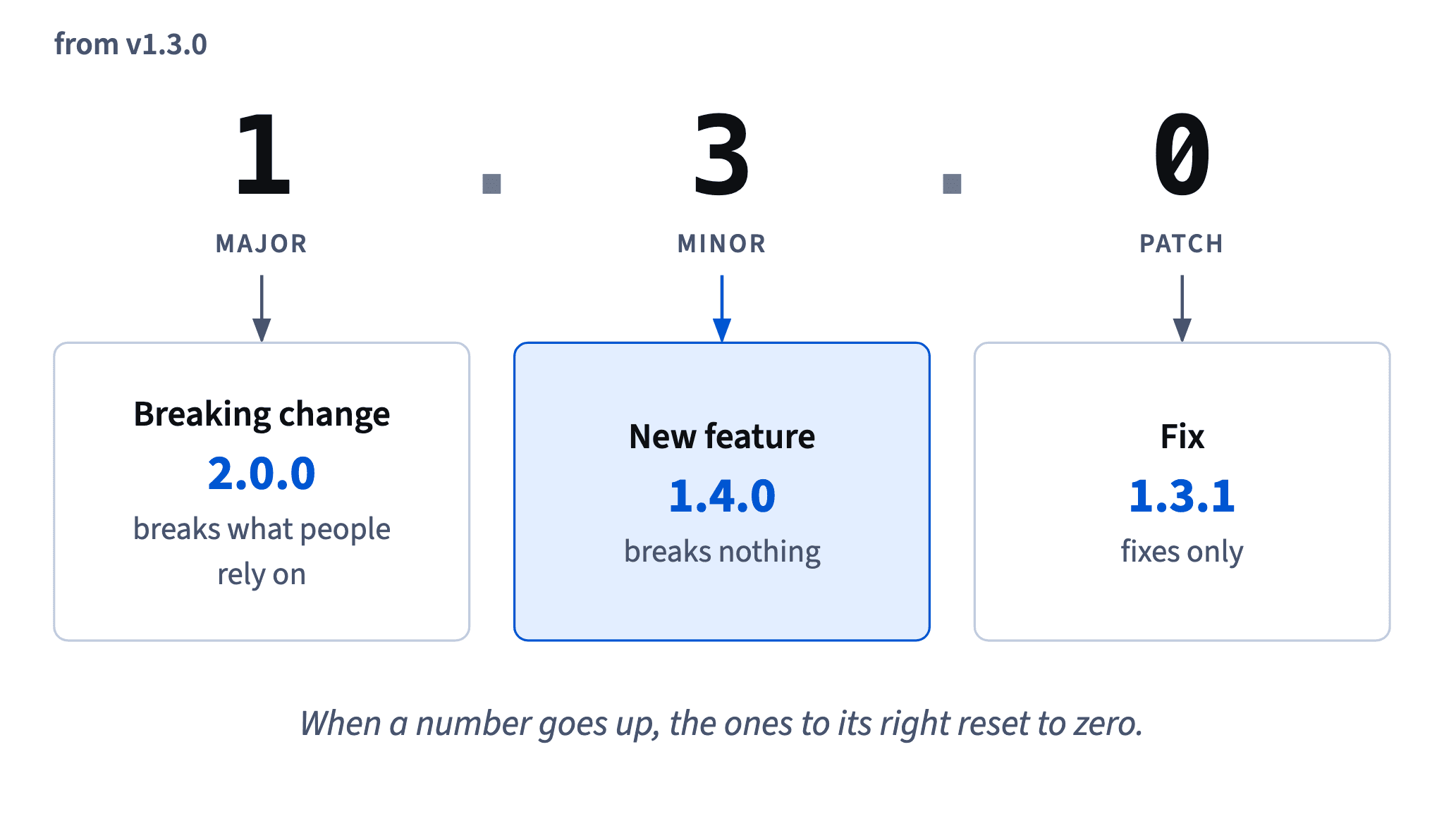
Semantic versioning, SemVer, writes a version as MAJOR.MINOR.PATCH, and each number tells you what kind of change happened:
- PATCH goes up for fixes:
1.4.0→1.4.1. - MINOR goes up for new features that break nothing:
1.4.1→1.5.0. - MAJOR goes up for changes that break something people rely on:
1.5.0→2.0.0.
When a number goes up, the ones to its right reset to zero. After 1.3.0, a fix gives 1.3.1, a new feature 1.4.0, a breaking change 2.0.0.
The formal rules at semver.org are written for software that other programs depend on. A website has to decide what “breaking” means for itself. CatChow's rule: MAJOR only if old links, saved carts or partner integrations stop working.
Two more conventions. The v in v1.4.0 is just a common habit for tag names; the version itself is 1.4.0. And a suffix marks a pre-release, a test version before the real one: 1.5.0-beta.1 comes before 1.5.0.
- DoAfter
v1.4.0, a gift note field at checkout →v1.5.0.New feature: MINOR up, PATCH reset.
- Don'tAfter
v1.4.0, a footer link fix →v1.5.1.A fix only raises PATCH:
v1.4.1.
Comparing versions: numbers, not alphabet
Is 1.4.10 older than 1.4.9? Alphabetically it would be, because “1” comes before “9”. In SemVer it isn't.
Compare versions part by part, left to right, each part as a whole number: MAJOR first, then MINOR, then PATCH. Ten is more than nine, so 1.4.10 is newer than 1.4.9. Any 1.x is older than 2.0.0, however big its other numbers.
Pre-releases sit just before the version they lead to: 1.5.0-beta.1 is newer than every 1.4.x but older than 1.5.0 itself. So in order:
v1.4.1 → v1.4.9 → v1.4.10 → v1.5.0-beta.1 → v1.5.0 → v2.0.0
Don't trust list order blindly. GitHub's tags page doesn't always sort tags by version, and a plain alphabetical sort gets 1.4.10 wrong. In a terminal, git tag --sort=v:refname compares the numbers as numbers, though pre-release suffixes need extra configuration to land before their release. When in doubt, compare the parts yourself.
- Do
1.4.9<1.4.10: compare 9 and 10 as numbers.Each part is a whole number.
- Don't“
1.5.0-beta.1is newer than1.5.0, it has more characters.”A pre-release comes before its release.
Publishing a GitHub release
A GitHub release is a page built on a git tag: the version number, release notes written for people, and files to download. The tag marks the exact commit; the release explains what changed since the previous one. All releases live under Releases in the repository.
As of 2026 the steps are: Draft a new release, type a new tag such as v1.4.0, target main (GitHub creates the tag when you publish), pick the previous tag, and press Generate release notes. GitHub lists every pull request merged since that tag, with its title and author, plus a Full Changelog compare link, so good pull request titles pay off twice.
Below the text are the assets: GitHub always adds the source code as zip and tar.gz files. Then two checkboxes: Set as a pre-release for test versions, and Set as the latest release, which gives the newest full release the Latest badge. In a terminal: gh release create v1.4.0 --target main --generate-notes.
v1.4.0
Latest · on 9c4a2d7 · release notes by Daniel and Sofia
v1.3.0
on 8be2f70 · no release page, tag only
At CatChow, publishing a release deploys nothing: every change was already live when it was merged. The release names and describes what's already there.
- Do
gh release create v1.4.0 --target main --generate-notesTag, target and generated notes in one go.
- Don't“The release is published, so the banner is finally on the site.”
At CatChow the deploy happened at merge time.
Release notes for humans, and a changelog
A changelog is a record of what changed in each version, written for the people who use it. Good release notes are that record for one version. The list GitHub generates is raw material, not the finished text: support won't understand “Add loyalty points behind a flag”, and must not tell customers about work that's still hidden.
What Generate release notes produced · shown above
So put a short “For customers and support” part on top, in plain words:
- what customers will notice (free delivery now starts at 1000 UAH);
- what was fixed (the checkout button no longer stays grey);
- nothing about hidden work behind a flag that's off.
Keep the generated list below it for engineers.
Some teams keep a CHANGELOG.md file with sections like Added, Changed and Fixed; others use the release pages as their changelog. A small config file, .github/release.yml, can make the generator group pull requests by label, so everything labelled bug lands under “Fixes”.
Read every line with one question: could support forward this to a customer as it is?
- Do“Fixed: the checkout button no longer stays grey after you change your cart.”
Plain words support can forward.
- Don't“* Add loyalty points behind a flag by @catchow-daniel in #155”
Engineer-speak, and it leaks hidden work.
Merged, released, visible: three different moments
“Is it live?” hides three separate questions:
- Merged: is the change in
main(ordevelop)? - Released: is it in a named version, a tag with release notes?
- Visible: can customers actually use it?
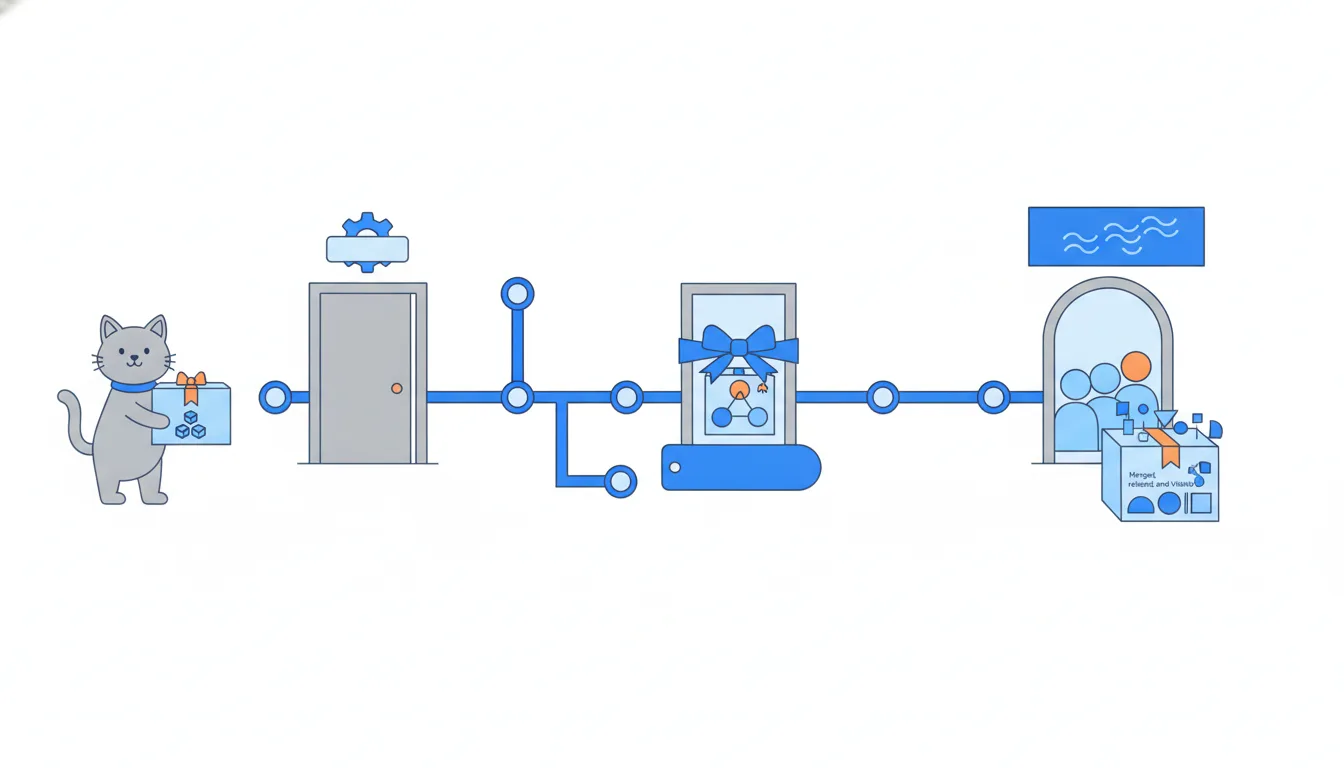
How far apart they are depends on the team. At CatChow, merged means live within minutes, and a release comes later as a named snapshot: #134 was live from last Wednesday and became part of v1.4.0 on Thursday. Flags split released from visible even there: #155 is in v1.4.0, and no customer can see it while loyalty-points is off.
In an app team on git flow, all three are far apart. A feature merged into develop waits for the release branch, then for the release and store review. Even after approval, the stores can roll a version out gradually to a growing share of users, so “released” can still mean “only some users so far”. And nobody sees anything until they update.
So before answering “is it live?”, ask yourself which of the three you're being asked about, and answer that one.
- Do“#155 is merged and released in
v1.4.0, but hidden: the flag is off.”All three moments, named.
- Don't“It's in
v1.4.0, so every customer can use it.”A flag or a gradual rollout can still hide it.
The compare view and the hotfix version
When the loyalty menu link leaked on Friday, the fix followed GitHub flow: a small pull request into main, reviewed, checked on the preview, squash-merged as e5f81a3 and deployed. In GitHub flow a hotfix isn't a special branch type, just a small pull request that jumps the queue. Nothing else had been merged since v1.4.0, so it became a PATCH release: v1.4.1. Had a new feature slipped in too, it would honestly be v1.5.0.
To see exactly what one version added over another, use the compare view: v1.4.0...v1.4.1 on GitHub, or git log --oneline v1.4.0..v1.4.1 in a terminal. It shows the commits reachable from the second tag but not from the first. Here that's one commit, e5f81a3 (#158).
That's also why release notes list only what's new since the previous version. #134 isn't in the v1.4.1 notes, yet it is in v1.4.1: it was already in v1.4.0, and v1.4.1 sits later on the same line, so it contains everything v1.4.0 does.
- Do
git log --oneline v1.4.0..v1.4.1→ one commit, #158Exactly what the new version added.
- Don't“#134 isn't in the
v1.4.1notes, sov1.4.1doesn't have it.”Notes list what's new, not everything inside.
Is the fix in this version? How to check
“Is #134 in v1.4.1?” has a reliable answer, and three ways to get it:
- The commit page. Open the commit of #134,
d51c7e8. As of 2026 GitHub lists the tags that contain it:v1.4.0andv1.4.1, but notv1.3.0. In a terminal,git tag --contains d51c7e8prints the same list. - The history. Look at the history of
mainup to the commit taggedv1.4.1; ifd51c7e8is on that line, the version contains it. - The release pages, in order. Find the first version whose notes mention the fix, then check that no later release reverts it. First appearance plus no revert since means it's in.
8be2f70Add cat treats bundlev1.3.06f2c8a1Raise free-delivery threshold to 1000 UAH (#133)a7d93e4Rewrite delivery page copy (#132)d51c7e8Fix checkout button after cart edits (#134)3b8e1f6Add autumn sale banner (#136)9c4a2d7Add loyalty points behind a flag (#155)v1.4.00d7b3c9Check flag before showing menu linkfix/loyalty-menu-linke5f81a3Hide loyalty menu link when flag is off (#158)mainv1.4.1
Commit graph, oldest first: main with two new tags 1. commit 8be2f70 on main "Add cat treats bundle", tagged v1.3.0 2. commit 6f2c8a1 on main "Raise free-delivery threshold to 1000 UAH (#133)" 3. commit a7d93e4 on main "Rewrite delivery page copy (#132)" 4. commit d51c7e8 on main "Fix checkout button after cart edits (#134)" (highlighted) 5. commit 3b8e1f6 on main "Add autumn sale banner (#136)" 6. commit 9c4a2d7 on main "Add loyalty points behind a flag (#155)", tagged v1.4.0 7. branch fix/loyalty-menu-link starts from commit 9c4a2d7 8. commit 0d7b3c9 on fix/loyalty-menu-link "Check flag before showing menu link" 9. commit e5f81a3: fix/loyalty-menu-link squash-merged into main "Hide loyalty menu link when flag is off (#158)", tagged v1.4.1
Two checks look tempting but don't answer the question. The v1.4.1 notes alone list only what's new since v1.4.0. And a Merged badge only says the change is in main, not which version holds it.
The answer support can forward: “fixed in 1.4.0, and in every version since”, as long as nothing reverted it. That “unless” matters: a later version can take a change back out.
- Do
git tag --contains d51c7e8→v1.4.0,v1.4.1A direct, reliable answer.
- Don'tSearch the
v1.4.1notes for #134 and answer “no”.Notes list only what's new in that version.
Ready to practise?
Answer the lesson's exercises and earn 250 points the first time you finish it.
Start the exercises