

Theory
Merge conflicts on GitHub: why they happen and what to do
What a merge conflict on GitHub is and why two branches can clash on the same line, what "This branch has conflicts that must be resolved" means, how to read conflict markers and resolve a simple conflict in the browser, and why choosing the right text is a product decision.
~11 min read · 11 exercises · 250 points
Before you start
Emma's grey button
An ordinary day on CatChow's product team, until Emma, who writes the shop's copy, sends a panicked message. Her pull request #132 says the branch has conflicts that must be resolved, the merge button is grey, and she thinks she broke the site.
In this lesson you'll find out why two branches can clash on the same line, read the conflict markers, resolve a simple conflict in the browser and see why choosing the right text is a product decision.
A conflict blocks one merge, nothing else
Emma, CatChow's content marketer, opens her pull request #132, "Rewrite delivery page copy", and sees "This branch has conflicts that must be resolved". The merge button is grey. Her first thought: she broke the site.
Rewrite delivery page copy#132
This branch has conflicts that must be resolved. Conflicting file: pages/delivery.md
Raise free-delivery threshold to 1000 UAH#133
Merged yesterday as commit 6f2c8a1
She didn't. A merge conflict blocks one merge and nothing else. main, the live site and Emma's work on her branch are all exactly as they were. The pull request simply waits until someone makes a decision.
What happened? Daniel's pull request #133, already merged, raised the free-delivery threshold and changed one sentence on the delivery page. Emma rewrote the whole page, that sentence included. Git received two different versions of one line and refused to guess which one should win.
The message also names the file, here pages/delivery.md, so you know where to look. For a PM, the right first reaction is calm: nothing is live, nothing is lost, and the fix is a conversation about what the page should say.
- Do"Nothing is broken; #132 just needs a decision about line 12."
- Don't"There's a conflict, roll back the site!"
The site never received the conflicting change.
When Git stops and asks
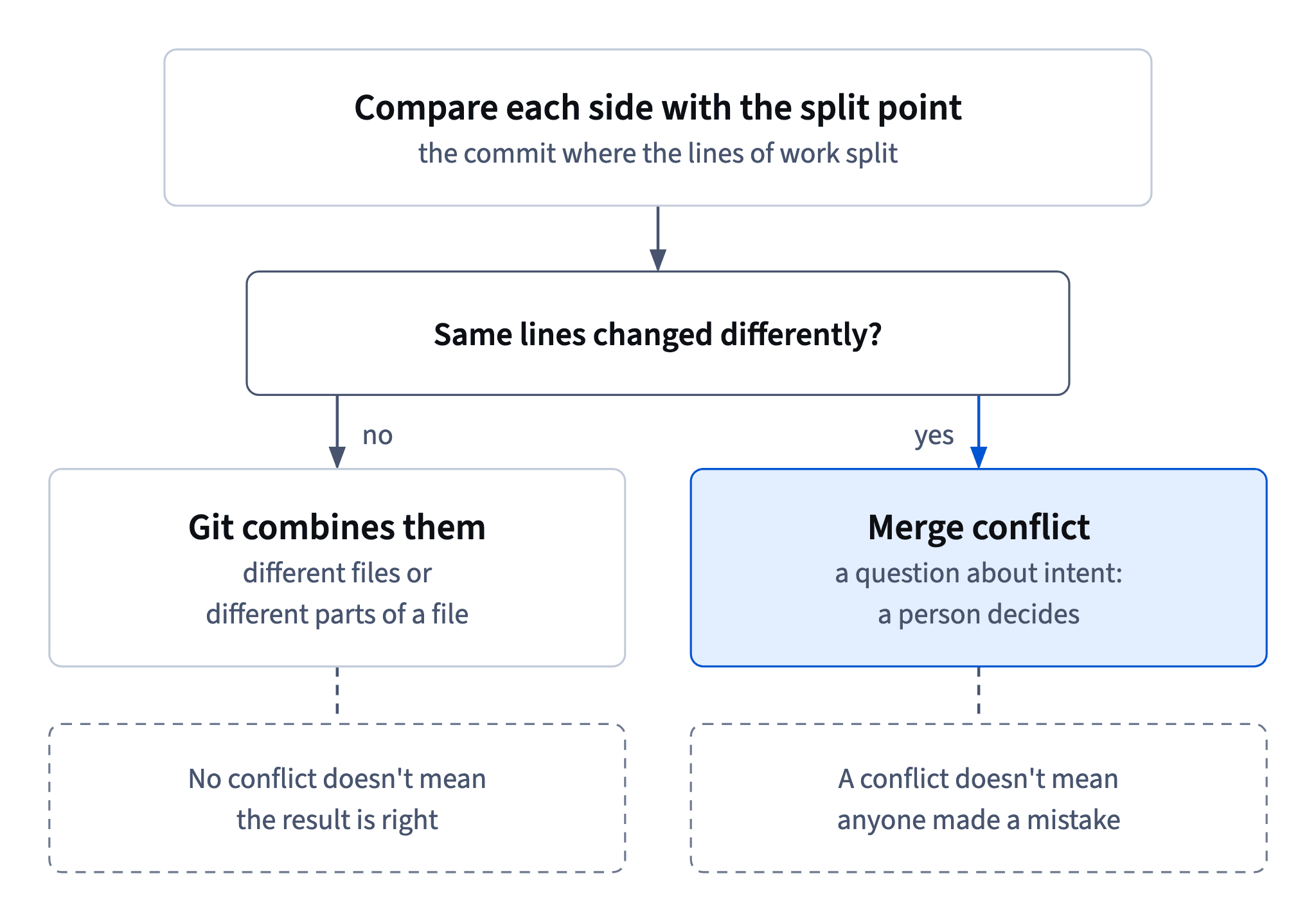
To merge, Git finds the commit where the two lines of work split, their common starting point, and compares each side with it.
- If only one side changed a spot, Git takes that change.
- If the sides changed different files, or different parts of the same file, Git combines them on its own. That's most merges.
- If both sides changed a spot to exactly the same text, there's nothing to disagree about.
A merge conflict appears only when both sides changed the same lines, or lines right next to each other, in different ways, or when one side deleted a file the other edited. There's no rule for that case: which version wins is a decision, and Git leaves decisions to people.
In #132 the starting point said "Free delivery on orders from 800 UAH." main changed it to "...from 1000 UAH." Emma's branch changed it to "Orders from 800 UAH ship free, right to your door." Same line, two different edits: conflict. Neither Daniel nor Emma did anything wrong; they just touched the same sentence in the same week.
e7c3b19Add summer promo bannerf02a6d4Update FAQ answerse19c3b7Rewrite delivery page copycontent/delivery-copy8be2f70Add cat treats bundle6f2c8a1Raise free-delivery threshold to 1000 UAH (#133)main
Commit graph, oldest first: content/delivery-copy and main today 1. commit e7c3b19 on main "Add summer promo banner" 2. branch content/delivery-copy starts from commit e7c3b19 3. commit f02a6d4 on main "Update FAQ answers" 4. commit e19c3b7 on content/delivery-copy "Rewrite delivery page copy" (highlighted) 5. commit 8be2f70 on main "Add cat treats bundle" 6. commit 6f2c8a1 on main "Raise free-delivery threshold to 1000 UAH (#133)" (highlighted)
- DoExpect a conflict when two people edit the same sentence differently
- Don'tExpect a conflict because two people edited the same file
Different parts of one file merge on their own.
No conflict isn't the same as correct
Git is a careful text merger, not a tester. It compares lines, and it stops only when the same lines were changed in two ways. It doesn't know what the page looks like, what the cart calculates or whether two features get in each other's way.
Remember Daniel's checkout story. His redesign branch and a colleague's cookie notice bar changed different files, so Git merged them without a word. On phones the bar sat on top of the new button, nobody could tap it, and the merge was reverted ten minutes later. No conflict, broken result.
Keep both halves in mind:
- No conflict doesn't mean the result is right. After any merge that combines work from different people, check the page, ideally on a phone too.
- A conflict doesn't mean anyone made a mistake. It only means two people changed the same text, and a person needs to decide.
For a PM this is a useful split of trust: let Git handle the text, and keep checking the product yourself.
- Do"Merged cleanly. Let's check checkout on a phone before we announce it."
- Don't"GitHub showed no conflicts, so it definitely works."
Git checks lines of text, not behaviour.
Reading the conflict markers
Under the conflict message in #132 there's a Resolve conflicts button. It opens a simple editor right on GitHub, with the conflicting file loaded. It looks like plain text with strange arrows in the middle:
## Delivery

<<<<<<< content/delivery-copy
Orders from 800 UAH ship free, right to your door.
=======
Free delivery on orders from 1000 UAH.
>>>>>>> main

Couriers deliver within one day in Kyiv.
These are conflict markers:
<<<<<<<opens the conflict and names the branch the upper version came from, here Emma'scontent/delivery-copy;=======divides the two versions;>>>>>>>closes the conflict and names the other branch, heremain, whose version sits just above it.
Everything outside the markers is already settled: the heading and the courier line need no decision. Only the part between the arrows waits for a human. And the markers aren't text for the page: all three marker lines have to go. Engineers see exactly the same markers in their code editor after git merge in a terminal.
- DoDecide only between
<<<<<<<and>>>>>>>; leave the rest as it is - Don'tRewrite the heading and courier line while you're in the editor
Lines outside the markers are already settled.
A conflict is a question about intent
Emma's first instinct is to keep her version; it's her pull request, after all. But then the page would promise free delivery from 800 UAH while the cart, after #133, makes it free only from 1000. Customers would pay for delivery the page called free. Keeping Daniel's line instead would throw away Emma's rewrite, which marketing approved.
So the right answer is neither side: Emma's words with Daniel's number, "Orders from 1000 UAH ship free, right to your door."
That's the heart of resolving conflicts. A conflict isn't an error, it's a question: what did each person mean, and what should the page say now? Git can't answer that. Engineers can resolve any conflict technically, but they often don't know whether finance changed its mind again or which wording marketing approved. That's where a PM comes in.
In the editor you can keep one side, keep both, or write something new. Choose by intent, not by whose pull request it is, and make sure the final text reads as one coherent page.
- Do"Orders from 1000 UAH ship free, right to your door."
Approved words plus the current threshold.
- Don'tKeep your own side because it's your pull request
The page would contradict the cart.
Resolving a conflict on GitHub
For a conflict in a text file, GitHub's web editor is enough. The steps, in order:
- On the pull request, click
Resolve conflicts. - Find the block between
<<<<<<<and>>>>>>>. - Replace the whole block with the agreed text, and delete all three marker lines. Here: "Orders from 1000 UAH ship free, right to your door."
- Click
Mark as resolved. It tells GitHub this file is settled. If several files conflict, pick the next one from the list on the left and repeat. - Click
Commit merge. - Check the pull request's
Files changedtab the way a reviewer would: it should show just Emma's rewrite, with 1000 on line 12 and no trace of 800. Then get a review and merge the pull request as usual.
The order matters: editing before Mark as resolved, and that before Commit merge. And resolving is not the finish line: it only updates the branch. The change reaches main, and the site, when the pull request itself is reviewed and merged.
- DoEdit →
Mark as resolved→Commit merge→ checkFiles changed→ review and merge - Don'tAnnounce the new copy as soon as you click
Commit mergeThe pull request still has to be reviewed and merged.
Leftover markers end up on the page
When you commit a resolved merge, Git trusts you. Whatever is in the file at that moment is the resolution. Git doesn't clean up for you: a forgotten <<<<<<<, ======= or >>>>>>> is just text, it gets committed like any other line, and after the merge it can show up on the live delivery page for every customer to see.
That's why Daniel says "check that twice". GitHub's web editor helps a little, because it expects the markers to be gone before you mark a file as resolved. In a terminal nothing stops anyone. Engineers protect themselves with git diff --check, which flags leftover conflict markers, or by searching the file for <<<<<<< before they commit.
For a PM the safety net is the review. After a resolution, open Files changed and scan the conflicting file: you should see the agreed text and no arrows or rows of equals signs. If you do spot a marker, comment on that line before anyone merges.
- DoScan
Files changedfor<<<<<<<,=======and>>>>>>>before approving - Don't"Git will tidy up the markers when it merges."
Markers are committed as ordinary text.
Where the resolution lands
What does Commit merge actually commit, and where? A merge commit on the pull request's branch, not on main. To resolve the conflict, GitHub merges main into content/delivery-copy with your decision inside. As of 2026 its message reads "Merge branch 'main' into content/delivery-copy".
On a graph the merge arrow runs from main into the branch. After it, the branch has everything from main plus Emma's rewrite, so it's zero behind and the conflict message disappears. main itself hasn't changed. Emma's earlier commits are all still there; nothing was thrown away.
e7c3b19Add summer promo bannerf02a6d4Update FAQ answerse19c3b7Rewrite delivery page copy8be2f70Add cat treats bundle6f2c8a1Raise free-delivery threshold to 1000 UAH (#133)mainc90d4e7Merge branch 'main' into content/delivery-copycontent/delivery-copy
Commit graph, oldest first: After Commit merge 1. commit e7c3b19 on main "Add summer promo banner" 2. branch content/delivery-copy starts from commit e7c3b19 3. commit f02a6d4 on main "Update FAQ answers" 4. commit e19c3b7 on content/delivery-copy "Rewrite delivery page copy" 5. commit 8be2f70 on main "Add cat treats bundle" 6. commit 6f2c8a1 on main "Raise free-delivery threshold to 1000 UAH (#133)" 7. merge commit c90d4e7: main merged into content/delivery-copy "Merge branch 'main' into content/delivery-copy" (highlighted)
The merge button comes back and waits for review. Because CatChow squashes, that extra merge commit never reaches main's history: main gets one clean commit for #132.
So read the direction every time you see a merge in a graph. A merge into the branch means someone updated or resolved the branch; a merge into main means the work has landed. The site changes only with the second one.
- Do"Merge branch 'main' into content/about-page" → the branch was updated;
mainhasn't changed - Don'tRead a merge into the branch as "it's live"
Only a merge into
mainreaches the site.
Who resolves, and the PM's part
GitHub's web editor handles one kind of conflict: different edits to the same lines of a text file. That covers most conflicts in copy. Other kinds need the command line, for example when one branch deleted a file the other edited, or both replaced the same image. GitHub then deactivates Resolve conflicts and says the conflict is too complex for the web editor; that's an engineer's job.
Who resolves? Usually the author of the blocked pull request, together with the author of the change it collided with. The PM brings the answer to "what should it say?". That part of the job looks like this:
- find out what each side intended, for example from the other pull request and its issue;
- agree on the result with the people involved;
- write the agreed text and the reason in a pull request comment;
- check
Files changedafterwards.
And what not to do: pick a side just to turn the button green, resolve conflicts in code or config you don't understand, or edit someone else's branch without asking.
- Do"Agreed with Emma and Daniel: her wording, 1000 UAH from #133 (finance request)."
Intent, decision and reason, written down.
- Don'tResolve a conflict in the checkout's JavaScript because the editor lets you
Code conflicts belong to the engineers who own the code.
Fewer conflicts next time
Why did Emma's conflict happen at all? Her branch lived for more than a week and rewrote a whole page. Meanwhile main moved on without it: by the time she opened the pull request, the branch was three commits behind. Each of those commits was a chance to collide.
The risk grows with three things you can read straight off a pull request list: how long the branch has lived, how many files it touches and how far behind main it is. A one-file fix opened yesterday rarely collides. A six-week redesign touching 38 files and 41 commits behind almost certainly will, and its conflicts will be big.
The habits that prevent this:
- small branches, one task each, merged within days;
- bring fresh
maininto a longer branch early, while conflicts are still small; - talk: one line in the team chat, "I'm rewriting the delivery page this week", and Daniel would have pinged Emma before touching that sentence.
That last one is a PM job too: knowing that finance and marketing are changing the same page in the same week.
- Do"Heads-up: I'm rewriting the delivery page this week."
One line in chat prevents a collision.
- Don'tLet a 38-file redesign branch drift 41 commits behind
mainEvery commit it missed is a chance to collide.
Ready to practise?
Answer the lesson's exercises and earn 250 points the first time you finish it.
Start the exercises